



 Shopping Cart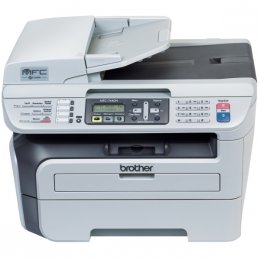

*** ALL TONERS AND SUPPLIES ARE IN STOCK AT DISCOUNTED PRICING , CALL +18882983095..
Printers do not include supplies - toners , drums (Imaging Units) (where applicable) , printer cables , manuals , consumables , trays (where applicable). Power cables are included. Drivers can be downloaded at www.hp.com. Please verify that drivers available are compatible with your software on HP’s site.
Images are for illustration purposes only and do not necessarily reflect the actual product.Product Details
Specifications
Accessories
Reviews
Product Details
Overview of the Brother MFC-7440N Multifunction Copier / Printer / Fax
The Brother MFC-7440N is ideal for any desktop or small office. It can virtually fit in any workspace due to its compact, space-saving design. In addition to its crisp, razor-sharp printing, it can also be used to make a quick copy or send/receive faxes without the use of a computer. Enjoy the convenience of having a high-quality color scanner, too. Scan multiple pages using the 35-page auto document feeder or use the document glass for scanning a single document. Its advanced capabilities allow you to scan documents to a file, image, OCR, e-mail or to an FTP site - all with a touch of a button! Plus, with its built-in Ethernet network interface you can easily share the MFC-7440N with others in your office, too
Main Features of the Brother MFC-7440N Multifunction Copier / Printer / Fax
•Fast printing and copying. Print and copy speeds of up to 23 pages per minute.
•High-quality laser output. Produce crisp, rich black output up to 2400 x 600 dpi print resolution at a low cost per page that laser technology provides you.
•35-page auto document feeder. A quick and easy way to copy, fax or scan multi-page documents.
•Flexible paper handling. Features a 250-sheet capacity paper tray adjustable for letter or legal size paper. Plus, a single-sheet manual bypass for envelopes, labels or other types of media.
•Flatbed color scanning.. Use the document glass to scan pages directly to your e-mail application or to a single PDF file using the ADF.
•Fold-out rear output tray. Allows for a straight-through paper path and ideal when using the single-sheet bypass slot for printing envelopes or thicker media.
•32 MB standard memory. Stores up to 500 pages in memory for faxing and can handle multiple print jobs and copying.
•USB and Ethernet interfaces. Connect the MFC via USB to your computer or install it on a network for multiple users to share printing, scanning and faxing
|
Specifications |
|
|
Print Technology |
B/W Laser Technology |
|
Max. Black Print Speed (ppm) |
23ppm Black |
|
Print Resolution (maximum dpi) |
Up to 2400 x 600 dpi |
|
Standard Input Paper Capacity (sheets) |
250-Sheet Input Capacity |
|
Standard Memory (MB) |
32MB Memory |
|
Maximum Monthly Duty Cycle |
10,000 printed pages |
|
Recommended Monthly Print Volume |
250 to 2,000 pages |
|
Faxing Capability |
B/W Faxing |
|
Fax Modem Speed |
14.4K bps Fax Modem |
|
Best Transmission Speed (sec) |
Approx. 6 seconds per page |
|
Quick Scan (Memory Transmission) |
Approx. 2.5 sec/page |
|
Fax Page Memory |
Up to 500 page fax memory |
|
Copying Capability |
B/W Copying |
|
Max. Black Copy Speed (cpm) |
23cpm Black |
|
Reduction/Enlargement |
25% - 400% |
|
Scanning Capability |
B/W & Color Scanning |
|
Max. Interpolated Scan Resolution (dpi) |
Up to 19200 x 19200 dpi |
|
Optical Scan Resolution (dpi) |
600 x 2400 dpi |
|
Standard Network Features |
Printing, Scanning, PC Fax Send |
|
Power Source |
AC 120V 50/60Hz |
|
Power Consumption - Sleep/Ready/Copying |
10W / 75W / 460W |
|
Unit Dimensions (W"xD"xH") |
16.9" x 15.6" x 12" |
|
Unit Weight (lbs) |
24.4 lbs. |
|
Model |
MFC-7440N |
Professional installation available - please call for pricing
Specifications
Accessories

Reviews


Most printers have a paper-out detector. On most dot matrix printers it is a photo diode. If form-fed paper is not aligned correctly (usually on the left side) the diode won't see it.
What is Tray Capacity? Tray Capacity or Paper Capacity is the maximum number of pages that can be stored in the printer before you have to refill it.
Set your printer to maximum dpi setting to obtain the best image quality.
MY ACCOUNT
INFO & POLICIES
SHOP EASY
PAYMENT OPTIONS



