



 Shopping Cart
 Canon ImageClass MF462DW Multifunction Printer
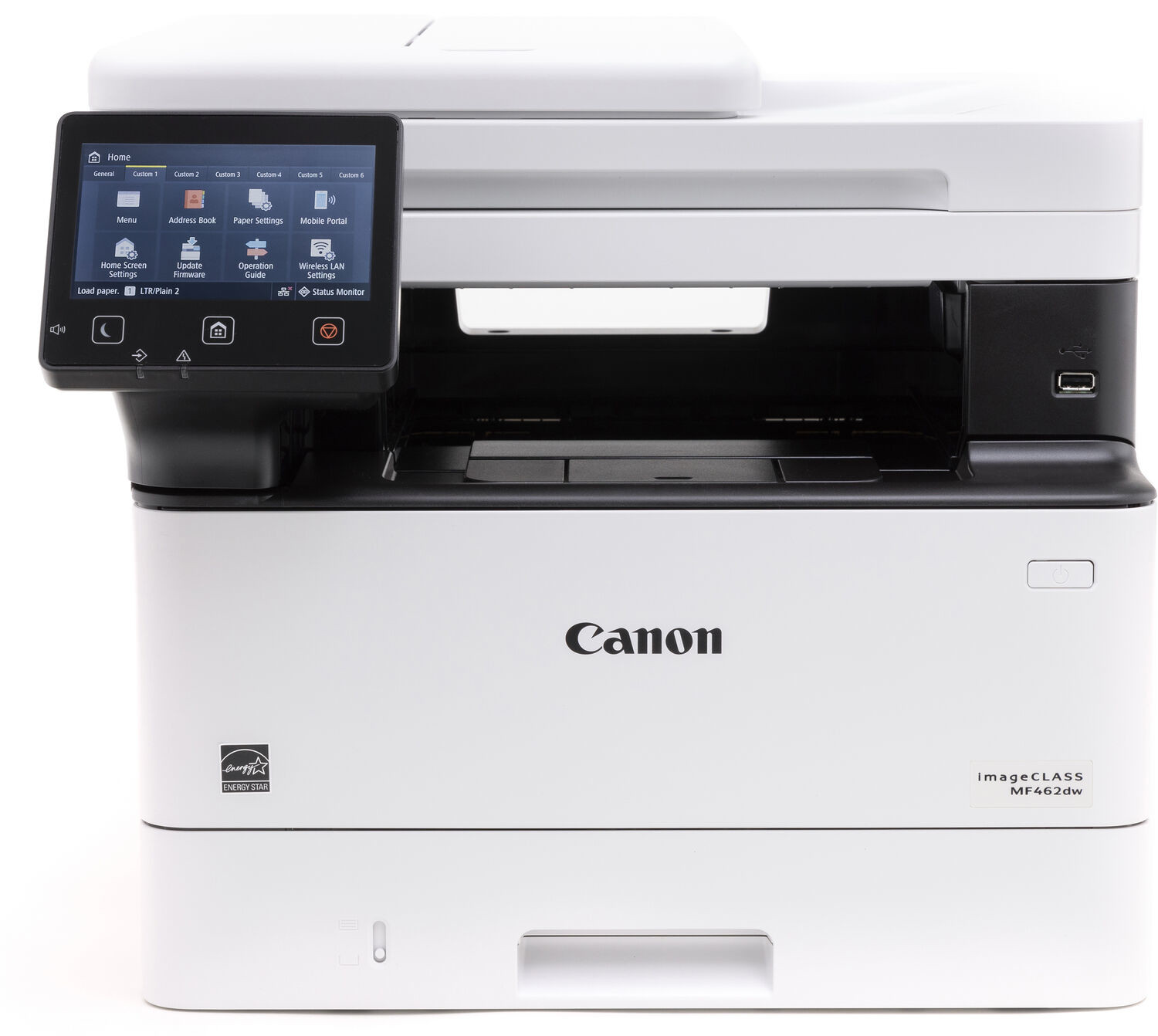



Images are for illustration purposes only and do not necessarily reflect the actual product.
Product Details
Specifications
Accessories
Reviews
Product Details
Main Features
- Speedy prints of up to 37 pages per minute
- Functions: Print, scan, copy and fax
- Easily scan up to 50 sheets with the automatic document feeder
- Connectivity: Wi-Fi, USB, Ethernet, USB Flash Drive
- Cloud connectivity: Print or scan documents to or from external webpages
- First print out in less than 5 seconds
- Adjustable 5 inch LCD touch screen
- Option of additional 550 sheet paper cassette
- Duplex prints
- Scan speed: Up to 100/ 80 images per minute in black/ color
Specifications
General Specifications
| Model Name | imageCLASS MF462dw |
| Functions | Print, Scan, Copy, Fax |
| Print Speed | Up to 37 ppm (Letter) |
| Document Feeder | 50 Sheets Duplex |
| First Print Out Time | Approx. 4.9 Seconds (Letter) |
| Print/Copy Resolution | Up to 1200 x 1200 dpi |
| Scan Resolution | Up to 600 x 600 dpi |
| Print Memory | 1 GB (RAM) |
| Printer Language | UFR II, PCL6, PCL5, Adobe® PostScript 3® |
| Network Security | Authentication Standard: Department ID Authentication. Network Standard: TLS1.3, IPSec support, IEEE 802.1X authentication, SNMPv3, IP Address Filtering, Configure ON/OFF settings for network application functions, Job Log Conceal Function, Restricted access to the printer's storage media, Verify System at Startup |
| Connectivity | USB 2.0 High-Speed, 10/100/1000 Base-T Ethernet (Network), Wi-Fi 802.11b/g/n |
| Operating Systems | Windows®10 / Windows®11 / Windows®Server2012 / Windows®Server2012 R2 / Windows®Server2016 / Windows®Server2019 / Windows®Server2022 macOS 10.13 (or later) |
| Paper Capacity | Standard: 250-Sheet Standard Cassette, 100-Sheet Stack Bypass (Multipurpose Tray), Optional: 550-Sheet Paper Cassette (AH-1) |
| Min / Max Paper Size | Standard / Optional Cassette: 4.1 x 5.8 to 8.5 x 14 Inches / Multipurpose Tray: 3 x 5 Inches to 8.5 x 14 Inches |
| USB Direct Print | JPG, TIFF, PDF |
| Display Panel | 5 Inch, Color Touch LCD |
| Print Volumes | 750-4,000 RMPV (Recommended Monthly Print Volume) |
|
Energy Consumption
|
Approx: 1250 W (Max., w/o Accessories), 8 W (Standby), 0.1 W (Sleep Mode) |
| ENERGY STAR | Yes |
| Unit Dimensions | 16.6" (W) x 18.1" (D) x 14.8" (H) |
 Download Manufacturer Specifications
Accessories

Reviews


Save memory on your PC by choosing the Custom option when you install your printer, and picking just the software you want to install.
Most printers will beep once or twice during or after initialization. If it beeps more than that or beeps constantly, it is telling you that something is wrong. Most printers beep when out of paper or out of ink.
Using heavy or stiff paper? Feed the paper one sheet at a time or try placing a sheet of plain copier or bond paper behind a heavy sheet.
MY ACCOUNT
INFO & POLICIES
SHOP EASY
PAYMENT OPTIONS



* Images are for illustration purposes only.