



 Shopping Cart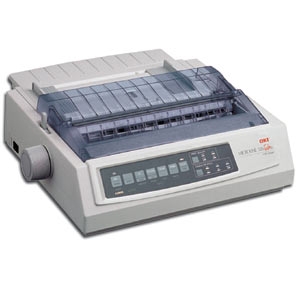

Product Details
Specifications
Accessories
Reviews
Product Details
Overview
With the Okidata ML-320TN the advantages of high-performance reliability, expanded head gap and zero-tear capability -all the advantages of the ML320/321 Turbo - can be enjoyed across your company network as well as accessed by users via the Internet.The ML320TN includes an OkiLAN 6120e 10/100 Base-T internal print server that is pre-installed and ready to perform.
Main Features
True Remote Management Capability Automatic outbound e-mail alerts 10/100 Base-T Ethernet connectivity; up to 470 Kbps data transfer rate Internal integrated solution Full Windows support: Millennium, NT 4.0, 2000, 98, 95 Full Novell support: NDS, NDPS, NLSP; IPX/SPX protocol support UNIX support HP JetAdmin and Web JetAdmin compatible Enhanced Web page " 10 "most recent" print job history Internet printing through Internet Printing Protocol IEEE parallel and now USB standard
Specifications
| Printer | ||
| Cartridge Printhead Duty Cycle: | 200 million characters | |
| Cartridge Printhead Included Qty: | 1 | |
| Compliant Standards: | ECP IEEE 1284-compliant port | |
| Connectivity Technology: | Wired | |
| Form Factor: | Desktop | |
| Interface: | Ethernet 10/100Base-TX , Parallel , USB | |
| Interface (Computer): | Parallel / USB | |
| Interface (Network): | Ethernet 10/100Base-TX | |
| Language Simulation: | EPSON FX , IBM PPR , Okidata Microline | |
| Max H-Resolution B/W: | 240 dpi | |
| Max Printing Speed: | 435 char/sec | |
| Max Sheets in Multi-Part Form: | 6 | |
| Max V-Resolution B/W: | 216 dpi | |
| Media Path Type: | Curved | |
| Media Sizes: | Roll (10 in) | |
| Media Type: | Continuous forms , Envelopes , Labels , Plain paper | |
| Monthly Duty Cycle: | 20000 pages | |
| Output Type: | Monochrome | |
| PostScript Support: | Not available | |
| Printhead Type: | 9 pin | |
| Technology: | Dot-matrix | |
| Type: | Personal printer | |
| Printer Output | ||
| Max Speed: | 290 char/sec | |
| Output Quality: | Max speed | |
| Max Speed: | 75 char/sec | |
| Output Quality: | Near letter | |
| Max Speed: | 390 char/sec | |
| Output Quality: | Draft | |
| Max Speed: | 435 char/sec | |
| Interface Required | ||
| Connector Qty: | 1 | |
| Connector Type: | 36 pin Centronics | |
| Gender: | Male | |
| Total Qty: | 1 | |
| Type: | Parallel | |
| Connector Type: | RJ-45 | |
| Type: | LAN | |
| Connector Type: | 4 pin USB Type A | |
| Type: | USB | |
| Interface Provided | ||
| Type: | None | |
| Miscellaneous | ||
| Color: | Beige | |
| Compliant Standards: | Plug and Play | |
| Product Color: | Beige | |
| Header | ||
| Brand: | OKI | |
| Compatibility: | PC | |
| Manufacturer: | OKI | |
| Model: | 320 Turbo/n | |
| Packaged Quantity: | 1 | |
| Product Line: | OKI Microline | |
| OS Required | ||
| Type: | Microsoft Windows 95/98 | |
| Type: | Microsoft Windows NT 4.0 | |
| Type: | Microsoft Windows Millennium Edition | |
| Networking | ||
| Compliant Standards: | IEEE 802.3 , IEEE 802.3u | |
| Connectivity Technology: | Wired | |
| Data Link Protocol: | Ethernet , Fast Ethernet | |
| Form Factor: | Integrated | |
| Network Transport Protocol: | IPX/SPX , TCP/IP | |
| Type: | Print server | |
| System Requirements | ||
| Min Operating System: | Microsoft Windows 2000 / NT4.0 , Microsoft Windows 95/98 , Microsoft Windows Millennium Edition , Microsoft Windows XP | |
| Power Device | ||
| Form Factor: | Integrated | |
| Frequency Required: | 50/60 Hz | |
| Nominal Voltage: | AC 120 V | |
| Power Consumption Operational: | 100 Watt | |
| Type: | Power supply | |
| Voltage Required Margin: | ± 10% | |
| Printer Fonts | ||
| Font Included Type: | Barcode | |
| Fonts Included Qty: | 8 | |
| Font Included Type: | Scalable | |
| Fonts Included Qty: | 2 | |
| Processor | ||
| Form Factor: | Integrated | |
| Installed Qty: | 1 | |
| Scanner | ||
| Type: | None | |
| Bay Provided | ||
| Type: | None | |
| Environmental Parameters | ||
| Humidity Range Operating: | 20 - 90% | |
| Max Operating Temperature: | 104 °F | |
| Min Operating Temperature: | 41 °F | |
| Sound Emission: | 57 dBA | |
| Battery | ||
| Type: | None | |
| Copier | ||
| Type: | None | |
| Modem | ||
| Type: | None | |
| Slot Required | ||
| Type: | None | |
| Software | ||
| Type: | Drivers & Utilities | |
| Dimensions & Weight | ||
| Depth: | 14 in | |
| Height: | 4.6 in | |
| Weight: | 15.4 lbs | |
| Width: | 15.7 in | |
| RAM | ||
| Installed Size: | 28 KB | |
| Max Supported Size: | 64 KB | |
| Type: | DRAM | |
| Upgrade Rule: | N/A | |
| Chassis | ||
| Type: | Proprietary cabinet | |
| Document & Media Handling | ||
| Media Size Class: | Other | |
| Flash Memory | ||
| Type: | None | |
| Hard Drive | ||
| Type: | None | |
| Office Machine | ||
| Functions: | Printer | |
| Monthly Duty Cycle (max): | 20000 pages | |
| Printing Output Type: | Monochrome | |
| Printing Technology: | Dot-matrix | |
| Type: | Printer | |
| PC Connectivity | ||
| PC Connection: | LAN , Parallel , USB | |
| Printing | ||
| Max Printing Speed B/W: | 435 char/sec | |
| Max Resolution B/W: | 240 x 216 dpi | |
Accessories

Reviews


Misplaced your printer manual? You can usually find a replacement manual online at the manufacturer's website.
When power is applied, you should hear the print mechanism initialize and most printers have at least one light which will be illuminated when it is on.
What is dpi? Dpi is used to describe the resolution number of dots per inch in a digital print. The higher the numbers, the more detailed the print image is.
MY ACCOUNT
INFO & POLICIES
SHOP EASY
PAYMENT OPTIONS



