



 Shopping Cart
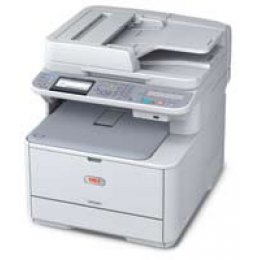
 Okidata MC361 Multifunction Printer
....

Product Details
Specifications
Accessories
Reviews
Product Details
Main Features
- Print and copy at speeds up to 23 ppm in color, 25 ppm in black & white
- HD Color printing technology for outstanding print and copy quality
- Multi-tasking functionality standard, enabling two tasks to be performed at once
- 3.5" backlit, tilting LCD operator panel with 1-touch fax dialing keys
- PCL and PostScript 3 emulations
- Duplex (2-sided) printing/copying, standard
- Full-featured fax with dual access functionality and 4 MB fax memory
- Multiple scan-to locations: PC, network, FTP, e-mail or USB memory stick
- Print from USB memory stick
- 350-sheet standard paper capacity, expands to 880 sheets with optional 2nd tray
- Banner printing capability on sheets up to 52" in length
- Color Access Policy Manager controls printing costs by defining usage rules
- Separate CMYK toner cartridges for lower cost of operation
- Compact design to fit even the smallest environment
- ENERGY STAR compliant
Specifications
General Specifications
| Print Speed (ppm) | 25ppm black, 23 ppm color |
| Printer Connectivity | Ethernet 10/100Base-TX and USB 2.0 connectivity |
| Print Resolution (dpi) | 1200 x 600 dpi |
| Printer Monthly Duty Cycle | 45,000 pages |
| Scan Resolution (maximum) | 1200 x 1200 dpi |
| Copy Speed (cpm) | 25 cpm black, 23 cpm color |
| Printer Fax Speed | 33.6 kpbs |
| Fax Memory (MB, pages) | 4MB, 200 pages |
| (ADF)- Auto Document Feeder | 50-sheet |
| Printer Memory | 256MB RAM, expandable to 768MB |
| Paper Input Capacity | 350 sheets |
| Printer Output Capacity | 150 sheets |
| Number of Paper Trays | 1 |
| First Page Out (seconds) | As fast as 9 seconds black, 8.5 seconds color |
| Printer System Requirements | Windows 7 (32/64-bit), Windows XP (32/64-bit), Vista (32/64-bit), Server 2003, Server 2008, 7; Mac OS version 10.3.9 to 10.6 |
| Printer Display (type/size) | 3.5" backlit, tilting LCD operator panel with 1-touch fax dialing keys |
| Printer Dimensions | 17.5"H x 16.8"W x 20"D |
| Printer Weight | 63 lbs. |
| Wireless Ready (Yes or No) | No |
| Network Ready (Yes or No) | Yes |
| Print Technology | Laser |
| Type of Printer | All-in-One |
| Shop by Use | Medium Office (5-10 users) |
| Output Type | Color |
| Type of Printer Connectivity | Network Ready & USB |
| Type of Duplexing (2-sided printing) | Manual |
| Maximum Paper Size | 8.5" x 14" |
Accessories

Reviews


Most printers have a paper-out detector. On most dot matrix printers it is a photo diode. If form-fed paper is not aligned correctly (usually on the left side) the diode won't see it.
What is Tray Capacity? Tray Capacity or Paper Capacity is the maximum number of pages that can be stored in the printer before you have to refill it.
Using heavy or stiff paper? Feed the paper one sheet at a time or try placing a sheet of plain copier or bond paper behind a heavy sheet.
MY ACCOUNT
INFO & POLICIES
SHOP EASY
PAYMENT OPTIONS



* Images are for illustration purposes only.