Quick Tips
- If you are printing on photo paper, make sure not to use the regular printer setting
- After installing a printer it’s a good idea to go to the Windows dialog box and check the settings, so you won't be surprised by what happens (or doesn't happen!) the first time you give a print command!
- Printing photos? Make sure that they are of print quality - meaning 300dpi. Anything lower than this will appear pixilated and lower than photo quality
- Printer not working? Check if the heads of the toners are clean or not. They must be cleaned periodically
Product Details
Accessories
Related Items
Overview
![]()
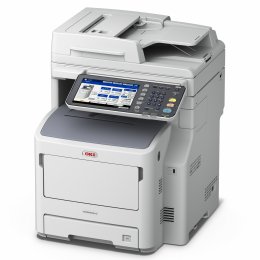
With the MB400 MFP Series, you can print, copy and scan, with available analog fax and network connectivity.
Professional, affordable solutions - print, copy, scan, and fax
Versatile, reliable and simple to operate
Everything the small workgroup requires
The MB400 MFP Series from OKI Printing Solutions combines black & white printing and copying, color/mono scanning, analog faxing1,and scan-to capabilities. These affordable, compact, networked MFPs let you produce professional-looking documentswith productivity-boosting speeds and budget-enhancing efficiencyand distribute themwith ease through simple, user-friendly steps.
All three models produce the first printed page in less than 6 seconds, and deliver up to 30 clear, sharp prints per minute (ppm) and up to 22 copies per minute (cpm).2 To help you control costs, all MB400 MFP models come with duplex (2-sided) printing standard, so you can save paper. And, for ongoing savings, their 2-piece consumables configuration lets you replace just a toner cartridge when you need to, instead of the toner cartridge and the image drum.
Sharing files and documents is a snap
Place your document on the flatbed platen and scan it in black & white or color. Save and send the electronic version to a folder on your PC, the network or FTP site, as an attachment to an e-mail address, or as a fax1. The MB470 and MB480 models offer robust fax features, including dual access (scan faxes into memory while sending or receiving), one-touch dialing, distinctive ring, broadcast faxing, fax forwarding, and LDAP support.
Document management also made easy
Among the utilities that come standard with the MB400 MFP Series are PaperPort and OmniPage by Nuance. PaperPort is the industry-leading, award-winning software that will enable you to easily organize your scanned files, further enhancing your productivity. With its intuitive, thumbnail-based interface, PaperPort lets you save any scanned document in a PDF or JPEG format, and quickly make it available for archiving or sharing.
The feature-rich OmniPage converts scanned documents and PDF files into editable file formats used by applications such as Microsoft Word, Excel, Adobe Acrobat or HTML files.
Main Features
- Professional, affordable solutions print, copy, scan, and fax
- Versatile, reliable and simple to operate
- Compact design, ideal for small office or small workgroup
- Internal Ethernet connectivity standard
- Fast black & white printing at up to 30 ppm, copying at up to 22 cpm
- Duplex (2-sided) printing standard
- Digital copying with zoom and multi-copy features
- Color scanning with send-to functionality
- Dual access functionality enables unit to scan faxes into memory while sending or receiving faxes
- Upgradable memory and paper capacity
MY ACCOUNT
INFO & POLICIES
PAYMENT OPTIONS