



 Shopping Cart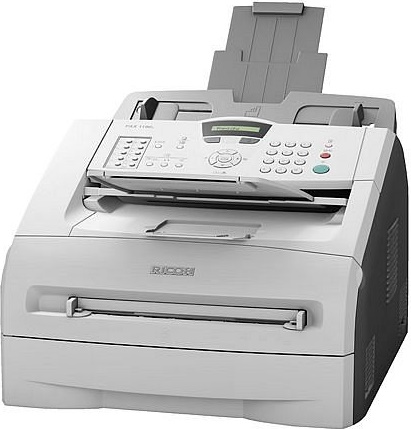



*** ALL TONERS AND SUPPLIES ARE IN STOCK AT DISCOUNTED PRICING , CALL +18882983095..
Printers do not include supplies - toners , drums (Imaging Units) (where applicable) , printer cables , manuals , consumables , trays (where applicable). Power cables are included. Drivers can be downloaded at www.hp.com. Please verify that drivers available are compatible with your software on HP’s site.
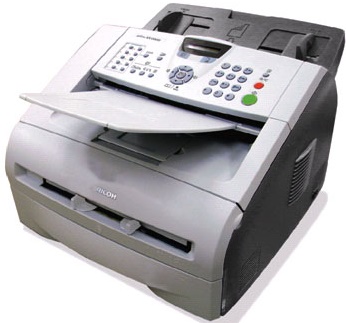
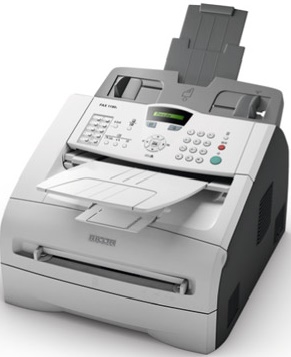
Images are for illustration purposes only and do not necessarily reflect the actual product.Product Details
Specifications
Accessories
Reviews
Product Details
Main Features
- Rely on a single, well-equipped system for faxing, printing and convenience copying.
- Complete two tasks simultaneously " such as sending a fax and making a copy " with dual access.
- Send fax documents with the Super G3 modem and a transmission time of just two seconds-per-page. You can also use the built-in PC-Fax Send feature.
- Forward incoming documents to another fax with remote fax forwarding. It can be accessed remotely, so mobile users always get their documents.
- Place this compact device right on the desktop, without taking up valuable space.
- Automatically resize incoming faxes. The system detects the paper size loaded in the tray, then reduces 8.5" x 14" faxes to fit.
- Hold received faxes in memory in case paper runs out while you are out of the office.
- Fax directly from your PC, without having to print documents first.
- Maintain separate phone and fax numbers on a single telephone line. Distinctive ringtones make it easy to differentiate phone calls from incoming faxes.* (* Requires Distinctive Ringing option from your local phone company)
- Send faxes to as many as 220 recipients with 20 One-Touch Dials, 200 Speed Dials and 8 Group Dials.
- Check the status of documents held in memory that are waiting to be sent.
- Print from your PC while you wait, or while sending or receiving a fax in memory.
Specifications
General Specifications
| Type | Desktop |
| Recording Method | Laser |
| Modem Speed | 33.6 Kbps (with Auto Fallback) |
| Maximum Transmit Speed | Approx. 2 sec.* (ITU-T Test Chart #1) |
|
*Approximately 2 seonds per page is dependent on optimal line quality.
|
|
| Data Compression | MH/MR/MMR/JBIG |
| Dual Access | Yes |
| Standard Document Memory | 16 MB (up to 500 pages) |
| Auto Dialer | 20 (10 x 2) One-Touch Dials, 200 Speed Dials, 8 Group Dials |
| Document Memory Backup | Up to 4 Days (up to 96 hours) |
| Automatic Document Feeder Capacity | 20 Sheets (20 lb. Bond) |
| Output Tray Capacity | 100 Sheets (Face down) |
| Maximum Width/Scan Width | 8.5" (216 mm)/8.2" (208 mm) |
| Document Length | 14" (356 mm) |
| Maximum Print Width | 8.2" (208 mm) |
| Recording Paper Capacity | 250-Sheets/1 Cassette Tray, 1 Sheet/Manual Feed Slot |
| Paper Sizes | Paper Cassette: Letter, Legal, Executive/A4, A5, A6, B5, B6 Manual Feed Slot: Width: 2.75" - 8.5" (69.9 - 215.9 mm); Length: 4.6" – 16" (116 – 406.4 mm) |
| Paper Types | Paper Cassette: Plain Paper, Recycled Paper or Transparencies Manual Feed Slot: Plain Paper, Bond Paper, Recycled Paper, Transparencies, Envelopes or Labels |
| Fax Scan Resolution | Standard: 203.2 x 97.8 dpi Fine: 203.2 x 195.6 dpi Super Fine: 203.2 x 391.2 dpi Photo: 203.2 x 195.6 dpi Halftone 64 Levels |
| Power Consumption | Power Saver Mode: 10 Watts Stand-by Mode: 80 Watts Operating Mode: 475 Watts |
| Power Requirements | 100/120V, 50/60Hz |
| Environment | 68° to 104° C, 10% to 95% RH or less |
| Dimensions (W x D x H) | 14.7" x 14.7" x 10.3" (374 mm x 374 mm x 262 mm) |
| LCD (Liquid Crystal Display) | 16 Characters x 1 Line |
| Weight | 16.21 lbs./7.35 kg (Without Toner Cartridge and Drum Unit) |
| Transmission Features | Automatic Redial, Batch Transmission, Broadcasting, Error Correction Mode (ECM), Daylight Savings Time Adjustment, Delayed Fax/Delayed Batch Transmission, Direct Fax Number Entry, Immediate Transmission, Memory Transmission, Polling Transmission, Programmable and Auto Cover Sheet, Remote Fax Retrieve, Sleep Mode, Transmission Result Report |
| Reception Features | Automatic/Manual Reception, Auto Memory Receive, Auto Reduction, Distinctive Ring, Telephone Answering Device (TAD), Fax Forwarding/ Remote Fax Forward, Fax Paging, Memory and Lock User Function, Notification of Reception, Out-of-Paper Reception, Volume Adjustment for Hearing Impaired, Polling Reception |
Laser Printing Features
| PDL | Windows GDI |
| Speed | 15 ppm (Letter)/600 x 600 dpi |
| Paper Size | Up to Legal Size (8.5" x 14") |
| Resolution | Up to 1200 x 600 dpi |
| Interface | USB 2.0 (Full-speed) |
| Operating System | Windows 2000/XP/Vista/7 |
| Other Features | Manual Duplex; Watermark; Scaling |
Copier Features
| Combine Copy |
2-in-1/4-in-1 |
Copy Features
| Copy Speed | 15 cpm |
| Reduction/Enlargement | 50 - 200% (1% increments) |
| Resolution | 200 x 300 dpi |
| Copies | Up to 99 |
PC Fax
| Interface | USB 2.0 (Full-speed) |
| Operating System | Windows 2000/XP/Vista/7 |
| Features | PC-Fax Send Only; Cover Page; Address Book; Broadcast; Remote Setup |
Accessories

Reviews


If the fax makes unusual noises, try to feed the piece of paper through again.
Usually the fax machine will have some sort of indicator when the toner is low.
Fax machines can be zapped by lightning easily, so you’ll want to have a good surge protector.
MY ACCOUNT
INFO & POLICIES
SHOP EASY
PAYMENT OPTIONS



