



 Shopping Cart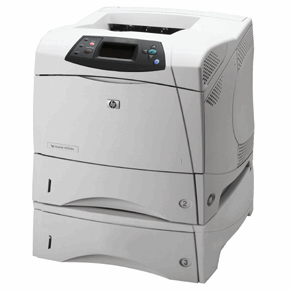

*** ALL TONERS AND SUPPLIES ARE IN STOCK AT DISCOUNTED PRICING , CALL +18882983095.
All reconditioned printers do not include supplies - toners , drums (Imaging Units) (where applicable) , printer cables , manuals , consumables, trays (where applicable). Power cables are included. Drivers can be downloaded from the manufacturers website. Please verify that drivers available are compatible with your software on the manufacturers site.
Product Details
Specifications
Accessories
Reviews
Product Details
Main Features
- Print Speed: 35 ppm
- Media Types: Envelopes, transparencies, labels, plain paper, cards, bond paper, recycled paper
- Prints color: Black and White
All our reconditioned printers are clean, tested and working.
Specifications
General Specifications
 Download Manufacturer Specifications
Accessories

Reviews


Most printers will beep once or twice during or after initialization. If it beeps more than that or beeps constantly, it is telling you that something is wrong. Most printers beep when out of paper or out of ink.
What is dpi? Dpi is used to describe the resolution number of dots per inch in a digital print. The higher the numbers, the more detailed the print image is.
Not all drivers are pre-installed on all operating systems and as new operating systems are released, you will need to install drivers yourself. Make sure to consult your printer manual.
MY ACCOUNT
INFO & POLICIES
SHOP EASY
PAYMENT OPTIONS



