



 Shopping Cart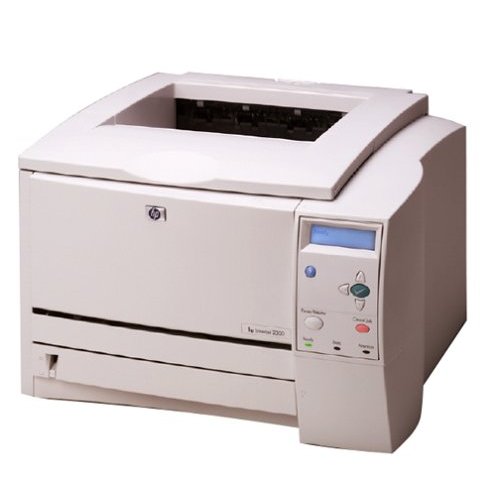

*** ALL TONERS AND SUPPLIES ARE IN STOCK AT DISCOUNTED PRICING , CALL +18882983095.
All reconditioned printers do not include supplies - toners , drums (Imaging Units) (where applicable) , printer cables , manuals , consumables, trays (where applicable). Power cables are included. Drivers can be downloaded from the manufacturers website. Please verify that drivers available are compatible with your software on the manufacturers site.
Images are for illustration purposes only and do not necessarily reflect the actual product.Product Details
Specifications
Accessories
Reviews
Product Details
Overview
Main Features
- 266 MHz
- Black and White Laser printer.
- 24 ppm
- INCLUDES JETDIRECT NETWORK CARD
- 10 seconds first page output
- 1200 x 1200 dpi
- 48MB RAM
- Network Ready
- Connects Via Parallel, USB or Fast Ethernet
Specifications
General Specifications
| Printer Type | Workgroup printer - laser - monochrome |
| Printer | |
| Print Speed | Up to 25 ppm - B/W - Letter A Size (8.5 in x 11 in) |
| Built-in Devices | status LCD |
| Connectivity Technology | Wired |
| Interface | Parallel, USB, LAN |
| Max Resolution ( B&W ) | 1200 dpi |
| Image Enhancement Technology | HP FastRes 1200 |
| Automatic Duplexing | Yes |
| PostScript Support | Standard |
| Language Simulation | PCL 6 |
| Fonts Included | 45 x PCL 6 35 x PostScript 3 |
| Processor | 266 MHz |
| Ram | |
| RAM Installed (Max) | 48 MB / 304 MB (max) |
| Technology / Form Factor | SDRAM |
| Media Handling | |
| Media Type | envelopes |
| Max Media Size (Custom) | 8.5 in x 14 in |
| Media Sizes | Letter A Size (8.5 in x 11 in) |
| Total Media Capacity | 350 sheets |
| Media Feeder(s) | 1 x autoload - 100 sheets - Legal (8.5 in x 14 in) 1 x autoload - 250 sheets - Legal (8.5 in x 14 in) |
| Max Media Capacity | 850 sheets |
| Duty Cycle | |
| Monthly Duty Cycle (max) | 50000 pages |
| Networking | |
| Networking | Print server - plug-in module |
| Data Link Protocol | Data Link Protocol |
| Miscellaneous | |
| Microsoft Certifications | Certified for Windows Vista |
| Compliant Standards | UL |
| Power | |
| Frequency Required | 50/60 Hz |
| Power Consumption Operational | 426 Watt |
| Power Consumption Stand by / Sleep | 10 Watt |
| Dimensions and Weight | |
| Width | 16.2 in |
| Depth | 17.7 in |
| Height | 10.2 in |
 Download Manufacturer Specifications
Accessories

Reviews


Use a lightly dampened cloth to clean the outside of your laser printer. To clean the inside, use a dry, lint-free cloth to make sure that no liquid enters the inner parts of the printer.
Getting blank pages after you installed a new cartridge? Check that the sticker from the cartridge was properly removed. Alternatively, run the clean print head function to make sure all air bubbles are removed. Do not remove the cartridge once it has been installed.
If your print settings are too dark, it could be detrimental to the life of the cartridge in the long run. It’s important that the density control of the machine be properly set to prevent the machine from pulling too much toner into itself.
MY ACCOUNT
INFO & POLICIES
SHOP EASY
PAYMENT OPTIONS



