



 Shopping Cart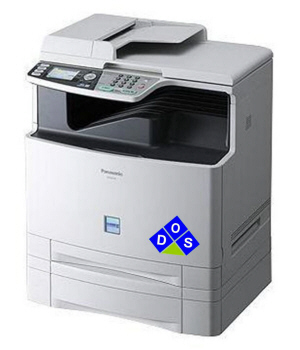

*** ALL TONERS AND SUPPLIES ARE IN STOCK AT DISCOUNTED PRICING , CALL 888.298.3095..
Printers do not include supplies - toners , drums (where applicable) , printer cables , manuals , consumables , trays (where applicable). Power cables are included. Drivers can be downloaded at www.hp.com. Please verify that drivers available are compatible with your software on HP’s site.
Product Details
Specifications
Accessories
Reviews
Product Details
Overview
Representing the first generation of A4 Business color Multi-Function Printers: the Panasonic DP-MC210 is the newest member to Panasonics line of multifunction office products. The compact, high performance design of the DP-MC210 makes it a perfect fit for a single office worker or a group of office workers who require network color printing, scanning, copying and faxing capabilities. The single-pass tandem print engine incorporated into the DP-MC210 ensures reliable device operation and consistent image quality, while lowering operating costs and simplifying maintenance.
Main Features
- Mono/Color Speed (CPM) -21cpm
- Output Resolution-600x600dpi
- First Copy Time 16 Second -B&W/20 Second Color
- Standard Paper Capacity -250-Sheets Tray
- Max Original Sizes-Letter/Legal
Professional installation available - please call for pricing
Specifications
| Mono/Color Speed (CPM) |
21cpm Color/B&W |
| Output Resolution | 600x600dpi |
| First Copy Time | 16 Second B&W/20 Second Color |
| Zoom | 25-400% |
| Standard Paper Capacity | 250-Sheets Tray |
| Max Original Sizes | Letter/Legal |
| Interface(s) | USB 2.0 |
| Network Interface | Standard Ethernet |
| Mono/Color Speed (PPM) | 21ppm Color/B&W |
| Mono/Color Resolution | 1200dpi Enhanced |
| PDL/PCL | GDI PCL 6 Emulation |
| Modem Speed (Kbps) | 33.6Kbps |
| Transmission Speed (Seconds Per Page) | 4.0 Seconds |
| Memory | 10MB |
| One-Touch/Speed Dials | 30 |
| Model | DP-MC210P |
Accessories

Reviews


If you need your copier to process multiple tasks simultaneously, you may need to purchase additional memory.
You might want to look out for an automatic duplexer on you copier, which will allow you to print double sided without any hassle.
Do not mix two types of paper in one tray of the copier.
MY ACCOUNT
INFO & POLICIES
SHOP EASY
PAYMENT OPTIONS



